


How to Digitize Slides Safely: A South Orange County Preservation Guide
In June 1968, your family likely captured a moment on 35mm film that now sits in a carousel gathering dust. It's a common story for many residents in South Orange County. Photographic preservation experts note that color slides can lose up to 20 percent of their original vibrancy every decade when they're stored in standard home conditions. You know these memories are irreplaceable. The desire to digitize slides is often met with the fear of losing them in a shipping container or feeling overwhelmed by technical terms like 4000 DPI. It's natural to feel protective of your family history and hesitant about the risks involved with big-box mail-in labs.
You deserve peace of mind and high-quality results that last for generations. This guide explains the step-by-step process to safely convert your aging slides into high-resolution digital memories without the risks of national mail-in services. We'll cover everything from the delicate cleaning of physical film to selecting the right file formats for sharing with your family. By following this local preservation path, you'll ensure your physical originals stay safe while your digital library grows. Let's look at how to protect your legacy today.
Key Takeaways
- Learn why the fragile nature of Kodachrome and Ektachrome film makes it vital to preserve your history before it fades.
- Master the professional process to digitize slides using high-resolution settings and specialized cleaning techniques for crystal-clear results.
- Identify common technical errors, such as incorrect bit-depth or "lossy" file formats, that can compromise your permanent digital archive.
- Discover how to properly organize and evaluate your collection to ensure every 110, 126, and 35mm slide is prepared for a successful transfer.
- Understand the security advantages of using a local Laguna Woods specialist to keep your irreplaceable memories safe from the risks of national shipping.
The Importance of Deciding to Digitize Slides in 2026
Time is a silent enemy for 35mm film. By 2026, many family slide collections will cross the 50-year mark. While Kodachrome film, introduced in 1935, is known for its archival stability, it isn't immortal. Ektachrome and other slide formats often show significant color shifting after just 30 years. These slides are far more fragile than standard 4x6 photo prints. The organic dyes used in the film layers naturally break down. This leads to a loss of detail that can't be recovered once the physical emulsion peels. You should digitize slides before these chemical changes become permanent.
For the 18,000 residents of Laguna Woods, the urgency is specific. Many locals moved to South Orange County during their peak retirement or travel years in the 1970s and 1980s. These boxes represent a lifetime of global adventures and family milestones. Preserving these memories allows you to share your legacy instantly on social media. It brings joy to grandchildren who may have never seen a slide projector in person. Taking action now ensures your history remains part of the family conversation.
Why Physical Slides Degrade Over Time
Film is a complex chemical sandwich. Over decades, the bond between the dyes and the acetate base weakens. A major threat is "Vinegar Syndrome," where the film base releases acetic acid. If you open a storage box and smell a sharp, sour odor, the degradation has reached a critical stage. Additionally, the heat from old 300-watt projector bulbs caused micro-damage every time you viewed them. This thermal stress created tiny cracks in the emulsion that worsen as the plastic becomes brittle with age.
The Digital Advantage for South OC Families
Modern technology offers a permanent solution for your aging media. When we digitize slides, we use a professional film scanner to capture every detail at high resolutions. This process offers several key benefits for your collection:
- Cloud Redundancy: You can store memories in multiple digital locations to prevent loss from fire or water damage.
- Organization: Digital files are easy to tag by year, location, or family member for instant searching.
- Color Restoration: Advanced software can reverse the yellowing of 1972 vacation photos, restoring original vibrant blues and reds.
Our Film & Tape Transfer service focuses on precision and care. We treat every individual slide as a piece of history. Converting your collection today ensures that the vibrant colors of your past don't fade into a blurry memory. It's a simple step to protect your most valued family stories for the next century.
How to Evaluate Your Slide Collection Before Scanning
Before you begin the process to digitize slides, gather every carousel, yellow box, and loose sleeve into a single climate-controlled room. South Orange County homes often have storage areas like garages or attics where temperatures can fluctuate by 30 degrees in a single day. These shifts cause film to expand and contract, which leads to brittle emulsion. Set up a clean, well-lit workspace with a light box or a white tablet screen to view the images clearly. This initial audit is the best time to categorize your collection by year or event. Grouping 1978 holiday photos together now prevents massive digital filing headaches once the files are on your computer.
Organization is a critical step for preserving memories. Use a soft pencil to mark dates on cardboard mounts, but avoid ink pens that can smear onto the film. If you find slides that are out of order, place them back into their original sequences. This structure ensures that the digital story follows the actual timeline of your family history. Most projects involve hundreds or thousands of individual frames, so a methodical approach at this stage saves hours of labor during the scanning phase.
Identifying Different Slide Mounts and Formats
Most collections consist of standard 35mm slides housed in 2x2 inch mounts. However, you will likely encounter 126 "Instamatic" slides, which were popular from 1963 through the late 1990s. These are easily identified by their square image area. You might also find 110 film, which is much smaller and often requires specialized adapters. Pay close attention to the mount material. Cardboard is the most common, but plastic was often used for premium processing. Glass-mounted slides are the most complex. These were designed to keep film perfectly flat for projection, but they often trap internal moisture. This creates "Newton rings" or fungal growth between the glass and the film, which requires expert handling to avoid permanent loss.
Assessing Damage and Cleaning Needs
Inspect each frame for physical obstructions like dust, hair, or mold. Use a dedicated, soft-bristled anti-static brush to remove surface particles. You should never use household chemical cleaners or tap water. These substances can strip the film emulsion or leave behind mineral deposits that ruin the image. If you see white, fuzzy spots, you are likely looking at mold growth. This is common in slides stored in humid environments. Brittle or warped mounts are another concern, as they often jam consumer-grade scanners and can scratch the film surface. If your slides appear too fragile for DIY handling, a professional film and tape transfer specialist can provide the delicate care needed to digitize slides without risking the original media.
Step-by-Step Guide: How to Digitize Slides Professionally
To digitize slides effectively, you must balance technical precision with a deep respect for the original media. This process ensures that family moments captured decades ago remain vibrant for future generations. Success depends on selecting the right equipment and maintaining a clean environment. It's not just about making a copy; it's about preserving the clarity and color that the original photographer intended.
Choosing Your Scanning Method: DIY vs. Pro
Home users typically choose between three main methods. Flatbed scanners with transparency adapters, such as the Epson V600, are accessible and versatile. They work well for large batches but often struggle with the dynamic range found in high-contrast slides. Dedicated slide scanners provide better optical density, which helps pull detail out of dark shadows. Advanced hobbyists often use the DSLR camera scanning method. This involves mounting a digital camera on a copy stand with a macro lens. It's a fast process, though it requires a significant investment in optics and lighting.
Smartphone apps don't have the optics needed for high-quality results. These apps rely on the phone's camera to photograph a backlit slide, which results in grainy images restricted to low resolutions like 72 DPI. This quality is insufficient for printing or viewing on modern 4K displays. Professional digitize slides services use specialized sensors that capture the full 35mm frame without these limitations.
The Professional Scanning Workflow
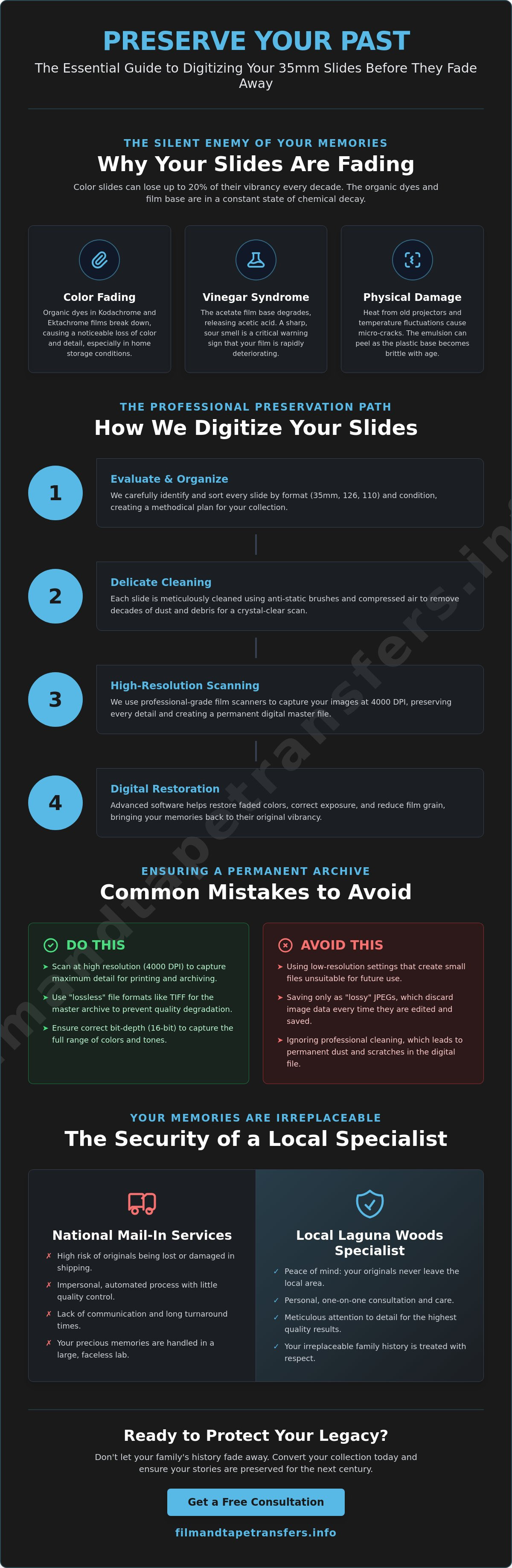
A professional workflow focuses on maximum detail extraction and image health. High-DPI industrial scanners, such as the Nikon Super CoolScan series, operate at 4000 DPI or higher. This resolution captures the actual grain of the film, ensuring the digital copy is a true archival master. The process begins with a 100% dust-free environment. Technicians use compressed air and anti-static brushes to clear the film surface before the scan starts.
- Digital ICE Technology: This system uses an infrared light source to detect physical defects. It automatically maps out dust and scratches, then repairs them digitally without blurring the actual image.
- Manual Color Restoration: Film dyes from the 1960s and 1970s often suffer from a magenta shift. This chemical breakdown turns photos purple or red over time. Professional editors manually adjust the color channels to restore natural skin tones.
- File Formatting: Saving images as uncompressed TIFF files preserves all data. These files are much larger than JPEGs but allow for better long-term preservation.
This structured approach ensures your history is safe. We focus on preserving memories by treating every slide as a unique piece of history. A careful workflow prevents damage and delivers a clear, bright window into the past. Trusting a dedicated Film & Tape Transfer specialist ensures these technical steps are handled with precision.
Common Mistakes to Avoid When You Digitize Slides
Preserving family history requires more than a basic scanner. Many people attempt to digitize slides at home only to realize the quality doesn't meet their expectations. Avoiding technical errors ensures your memories remain clear for another 50 years. It's about protecting the physical film while creating a digital file that lasts.
Resolution and File Format Traps
A common error involves using a low resolution like 1200 DPI. While 1200 DPI works for large photo prints, it's insufficient for a 35mm slide. A slide is only about 1.4 inches wide. Scanning at 1200 DPI produces a file roughly 1.5 megapixels in size. This results in heavy pixelation if you try to view the image on a modern 4K television or print an enlargement. Professional archival standards recommend 4000 DPI to capture every detail of the film grain. Use 48-bit color depth instead of the standard 24-bit. This captures trillions of colors, which helps when you need to restore faded tones later. Always save your master copies as TIFF files. Unlike JPEGs, TIFFs are lossless and don't lose data when you open or edit them.
Local Environmental Factors in South Orange County
Local climate plays a huge role in how well your physical media survives. In coastal areas like Dana Point, humidity levels often exceed 60 percent. This moisture encourages the growth of fungus and mold on the film emulsion. Conversely, Aliso Viejo attics are dangerous for film storage. Summer temperatures in these spaces can climb above 130 degrees Fahrenheit. Excessive heat causes the film base to become brittle and accelerates color shifting. Store your original slides in a temperature-controlled room. Use acid-free archival boxes rather than cardboard shoeboxes or plastic bins. Cardboard contains acids that yellow the film over time. Plastic bins can trap moisture, which leads to "vinegar syndrome," a chemical breakdown of the acetate film.
Don't forget the final step of digital preservation. Many users store their new files on a single USB drive. Hardware fails, and small drives are easily lost. Follow the 3-2-1 backup rule: keep three copies of your data, on two different types of media, with one copy stored off-site or in the cloud. This ensures your hard work isn't lost to a single hardware malfunction or a lost drive. When you digitize slides, the digital file is just as vulnerable as the physical one if it's not managed correctly.
Choosing a Local Slide Scanning Service in Laguna Woods
Selecting the right partner to digitize slides is the most critical step in your preservation journey. Many national services require you to pack your irreplaceable memories into a cardboard box and hand them over to a shipping carrier. This process introduces unnecessary risks like transit damage, package loss, or exposure to extreme temperatures in sorting facilities. By choosing a local service in Laguna Woods, you eliminate these variables. Your slides stay within your reach, providing peace of mind that no shipping label can offer.
Working with a local expert allows for direct communication that mail-in factories can't match. You can speak face-to-face with the technician who will actually handle your film. This interaction ensures your specific preferences for file formats, organization, and color restoration are understood. For residents in Mission Viejo and Irvine, the convenience of a short drive means your project starts immediately. You don't have to wait five to seven days for a box to arrive at a processing center. Local turnaround times are significantly faster, often returning your finished digital files and original slides a full week sooner than national competitors.
Choosing a South Orange County business also strengthens our local community. You're supporting specialists who live and work in the same neighborhoods as you. These technicians understand the value of OC family history. They treat every slide as a piece of local heritage rather than just another order number in a queue.
Why Film and Tape Transfers is the Trusted Choice
We've spent decades perfecting the art of archival preservation for families throughout Orange County. Our team functions as a trusted guardian for your history. We maintain a strict no-shipping policy; your slides never leave our secure Laguna Woods facility. This commitment to safety is why we're the preferred provider for local historians and families alike. You can learn more about our specialized equipment and quality standards by visiting our slide scanning service page.
Getting Started with Your Preservation Project
Preparing for a local drop-off is straightforward. We recommend grouping your slides by decade, vacation, or family milestone. Use small containers or archival boxes to keep them organized. During your initial consultation in Laguna Woods, we'll walk through your collection together to determine the best resolution for your needs. We provide clear guidance on how to digitize slides to ensure they look great on modern 4K screens. If your archive includes more than just still images, we also offer vhs to digital transfer for a complete media preservation solution. Your memories are ready to be rediscovered.
Secure Your Family History Before 2026
The year 2026 represents a critical milestone for aging media. As film dyes naturally degrade over the decades, the window to digitize slides with full color recovery is narrowing. You now understand how to evaluate your collection for physical damage and why professional handling avoids the common pitfalls of consumer-grade scanners. Proactive preservation ensures that your family's history doesn't fade into a purple haze of decayed emulsion. Professional-grade scanning is the only way to lock in the clarity of those original moments before they're lost to time.
Film and Tape Transfers has been locally owned and operated since 1990. We've spent over three decades as a trusted partner for families in Mission Viejo, Irvine, and San Clemente. Your original slides never leave our hands because we perform all hand-processed digitization on-site at our local lab. There's no shipping required and no risk of loss in transit. You can feel confident knowing your irreplaceable photos are being handled by experts who value your history. It's time to bring those hidden carousels back into the light.
Preserve your memories today with our Laguna Woods slide scanning service
Start your preservation project today and ensure these moments stay vibrant for the next generation.
Frequently Asked Questions
Can I digitize slides with my smartphone camera?
You can use a smartphone to capture slide images, but the quality won't match a professional scanner. You'll need a stable tripod and a consistent 5000K light source to prevent shadows and glare. Most phone sensors capture 12 megapixels, yet they often struggle to resolve the fine grain found in a 1x1.5 inch film frame.
What is the best resolution (DPI) for scanning 35mm slides?
A resolution of 3000 to 4000 DPI is the professional standard to digitize slides for archival use. This specific setting creates a 24-megapixel image file from the small film surface. It provides enough detail to print a sharp 11x14 inch photo without seeing digital pixels or blurriness.
How much does it typically cost to digitize a collection of slides?
Industry data from 2023 shows that professional scanning services typically charge between $0.40 and $1.20 per slide. A standard box of 500 slides usually results in a total between $200 and $600 at these market rates. These prices often include manual dust removal and basic cropping for every image.
Will digitizing my slides damage the original physical copies?
Professional scanning won't damage your physical slides when handled with care. Experts use white cotton gloves and compressed air to remove surface dust without scratching the emulsion. Modern scanners use cool LED lights that don't generate the 300-degree heat found in vintage projectors, which protects the film from warping.
How long does the professional slide scanning process take?
A typical order of 500 to 1,000 slides takes about 14 to 21 days to complete at a professional lab. Each individual slide requires roughly 2 minutes of hands-on time for cleaning, orientation, and quality checks. Local South Orange County specialists can often finish smaller family collections in under 7 business days.
What is the difference between scanning a slide and a negative?
Slides are positive images that look correct to the eye, while negatives require digital inversion to fix the colors. It's often more efficient to digitize slides because the original film already contains the final color balance intended by the photographer. Negatives need extra software processing to remove the orange mask layer.
Can you restore the colors on slides that have turned completely red?
Digital restoration can fix slides that turned red due to chemical aging. This specific color shift is common in Ektachrome film produced between 1960 and 1980. Technicians use RGB histogram balancing to pull the hidden blues and greens back into the image, restoring the original 1970s hues you remember.
Is it better to have my digital slides on a USB drive or in the Cloud?
We recommend using both a USB drive and Cloud storage to ensure your family history stays safe. A USB drive gives you a physical copy that you own and control without monthly fees. Cloud services provide a vital secondary backup that protects your memories from local risks like fires or floods.