


35mm Slides to Digital: The Complete South Orange County Preservation Guide (2026)
Last Tuesday, a resident in San Clemente discovered three dusty carousel trays filled with family vacations from 1978. Like many of us, they lacked a working projector and feared that sending these fragile memories through the mail might result in permanent loss. Converting your 35mm slides to digital shouldn't feel like a gamble with your family history. You deserve a local solution that treats your collection with the respect it earned over the last 40 years.
You likely feel overwhelmed by the sheer volume of slides sitting in your closet or confused by technical terms like DPI and bit-depth. We understand that these aren't just pieces of film; they're the only records of weddings, birthdays, and holidays. This guide promises to simplify the preservation process by highlighting professional local options in South Orange County. We will walk you through choosing high-resolution scanning settings and organizing your files so your family can finally enjoy these memories on a modern screen.
Key Takeaways
- Protect your family history by understanding the immediate risks of slide degradation and the vital steps needed to preserve your legacy.
- Discover the technical workflow used to transform physical media into high-resolution digital files using professional-grade scanning equipment.
- Compare the significant time commitment of DIY scanning against professional 35mm slides to digital services to find the best fit for your project.
- Master a simple organization system to identify and prepare various slide formats for a smooth and secure digitization process.
- Learn how local South Orange County experts provide a secure, hands-on approach to keeping your irreplaceable memories safe during the transfer.
Why Digitize Your 35mm Slides in South Orange County Today?
From the mid-1930s through the late 1990s, 35mm slides were the primary way families documented their lives. These small film positives captured the bright colors of Dana Point sunsets and family reunions in Mission Viejo with incredible detail. However, these slides weren't meant to last forever. They're a legacy format currently facing a silent crisis of degradation. By choosing to convert 35mm slides to digital, you're securing your family history against the inevitable passage of time. This archival preservation is more than a technical task; it's a meaningful gift to future generations who may never own a slide projector.
The Hidden Risks of Long-Term Slide Storage
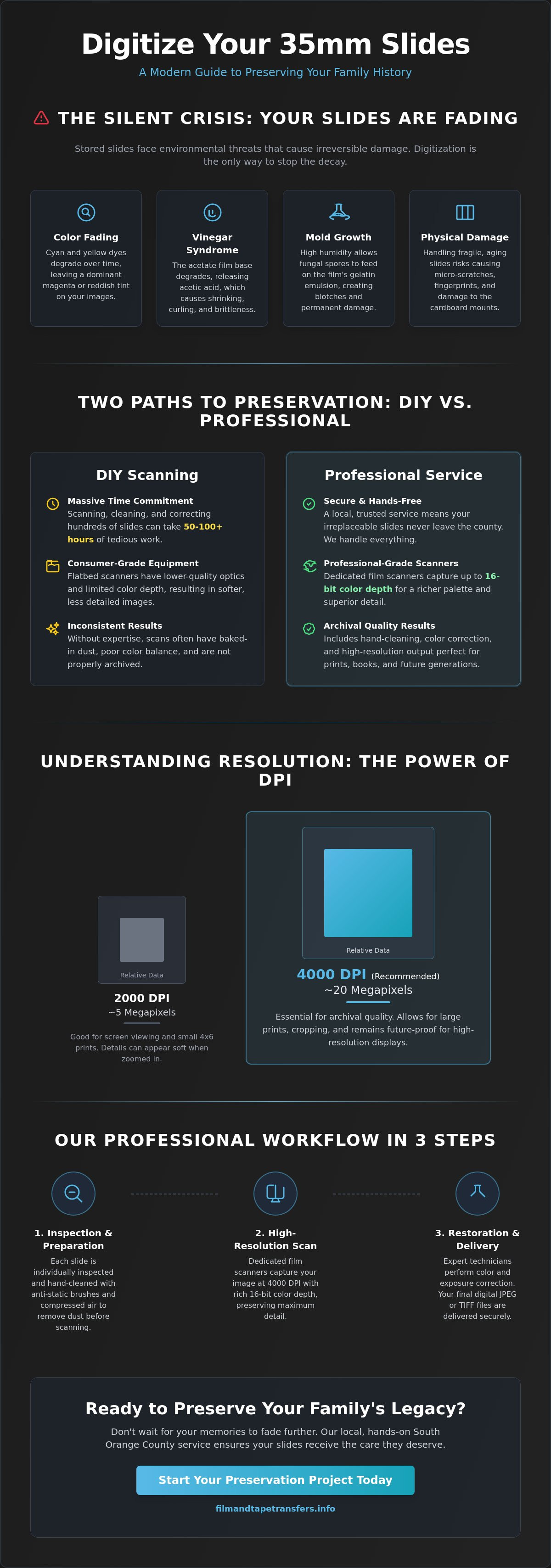
Most slides stored in South Orange County homes face significant environmental threats. High humidity levels and temperatures that often exceed 85 degrees in unconditioned storage spaces accelerate chemical breakdown. You might notice your slides developing a distinct magenta or orange tint. This color shifting indicates that the cyan dyes are fading. In some cases, slides develop "Vinegar Syndrome," a condition where the acetate base releases acetic acid and causes the film to shrink or curl. Mold growth is another common issue, as organic fungal spores feed on the gelatin emulsion of the film. Every time you handle an old slide, you also risk creating microscopic scratches or damaging the fragile cardboard frames. Understanding how image scanners work shows that professional equipment can often bypass these physical imperfections, but only if the film is still intact.
Why Digital is the Ultimate Backup for Laguna Woods Families
For residents in communities like Laguna Woods, space is often at a premium. Digital files offer a way to declutter without losing a single memory. Traditional slide shows require bulky projectors, heavy screens, and darkened rooms. These setups are often unreliable and difficult to maintain in 2026. Converting your 35mm slides to digital format allows for instant sharing via cloud storage or email. You can send an entire childhood's worth of photos to a relative in seconds. Digital backups also provide peace of mind. While a physical slide can be lost to fire or water damage, a digital file can exist in multiple locations simultaneously. Once digitized, these images can be used to create high-quality prints, custom photo books, or even large-scale wall art for your home.
Understanding the 35mm Slide to Digital Conversion Process
The transition from a physical slide to a digital file requires a meticulous sequence to preserve every detail. Professional conversion starts with a physical inspection of each slide mount. We move from the physical slide to a high-resolution JPEG or TIFF file through a series of light-sensitive sensors. While consumer flatbed scanners often produce soft, muddy images, professional-grade dedicated film scanners utilize high-quality optics to capture the silver halide grains in the film. These professional machines often capture 14-bit or 16-bit color depth, providing a much richer palette than a home office scanner.
Hand-cleaning is a vital first step that cannot be skipped. We use anti-static brushes and compressed air to remove loose debris before the slide enters the scanner. This prevents surface dust from being permanently baked into the digital image. If dust isn't removed physically, it creates "noise" that software struggles to fix without blurring the underlying picture. Color correction follows the scan. Over 30 years, chemical dyes in 35mm slides often degrade, leading to a heavy red or blue tint. Our process adjusts these levels to restore the vibrancy you remember from the original moment.
The final output format matters. JPEGs are perfect for sharing on social media or viewing on a tablet. TIFF files are much larger and uncompressed, making them the preferred choice for enthusiasts who want to perform their own advanced editing later. Choosing the right path for your 35mm slides to digital project depends on how you plan to use the images in the future.
Resolution and DPI: What You Actually Need
DPI, or Dots Per Inch, determines the amount of detail captured from the small 35mm frame. A 2000 DPI scan produces a file roughly equivalent to 4 or 5 megapixels, which works for standard screen viewing. However, a 4000 DPI scan yields an 18 to 20-megapixel image. This higher resolution is essential if you plan to zoom in on faces or create large-format prints. It ensures your 35mm slides to digital transfer remains future-proof as television and monitor resolutions continue to increase. High-resolution scans allow you to see the texture of clothing and clear background details that lower resolutions simply miss.
The Importance of Dust and Scratch Removal
Even clean slides often have microscopic imperfections or "pepper" spots. Digital ICE technology uses a dedicated infrared light source to find physical defects on the film surface during the scanning process. It maps these spots and replaces them with surrounding image data. Digital ICE is an infrared-based hardware solution for cleaning. For slides with heavy mold or deep gouges, manual post-processing is required to rebuild the damaged areas pixel by pixel. Taking the time to preserve memories correctly ensures these family stories last for another century without the distractions of age and wear.
DIY Scanning vs. Professional Services: Which Is Best for You?
Deciding how to convert 35mm slides to digital usually involves balancing your budget against your free time. Many hobbyists start with the intention of scanning their entire history at home. While the idea of a DIY project feels personal, the technical reality is often overwhelming. You aren't just buying a machine; you're taking on a complex preservation project that requires specialized knowledge and significant patience.
The Hidden Costs of DIY Slide Digitization
A high-quality dedicated film scanner represents a significant upfront investment. Consumer-grade flatbed scanners often produce soft, muddy images that fail to capture the crispness of the original film. To get professional results, you'll likely spend between $500 and $1,500 on equipment and software licenses. Your personal time is the most expensive factor. Scanning a single slide at high resolution takes approximately 5 to 10 minutes. This process includes:
- Cleaning dust from the film surface with compressed air or brushes
- Adjusting the crop and orientation for every frame
- Running multiple passes for infrared dust removal
- Manual color correction for fading dyes
If you have a collection of 500 slides, you are committing to over 40 hours of focused labor. Most home setups lack the professional color restoration tools needed to fix the "magenta shift" common in slides from the 1960s and 1970s. Without these tools, your digital files might look worse than the physical originals. The learning curve for professional scanning software is steep, and it's easy to make amateur mistakes that result in pixelated or distorted images.
Why Hand-Scanning Matters for Your Collection
Safety is a major concern when handling irreplaceable family history. Many consumer scanners use "auto-feed" mechanisms to speed up the process. These plastic rollers can jam or slip, which risks scratching the delicate emulsion of your film. Professional labs avoid these risks by using manual handling techniques. A human eye checks every frame for focus and proper alignment before the scan begins. This ensures that a slide of a grandchild's first steps or a wedding day is treated with the respect it deserves.
Choosing a professional slide scanning service in Laguna Woods removes the stress of the technical learning curve. You don't have to worry about software glitches or hardware failures. Instead, you receive a "trusted" result that preserves your 35mm slides to digital format with perfect clarity. Expert technicians use calibrated monitors to ensure the colors you see on your screen match the memories in your heart. This steady, reliable approach protects your physical media while delivering a high-quality digital archive for the next generation.
How to Prepare Your Slide Collection for Digital Scanning
Preparing your archives for the transition from physical to digital requires a methodical approach to ensure every memory is preserved accurately. Before you bring your collection to a professional lab, you must identify what you have. While 35mm slides are the most common format found in South Orange County homes, many collections from the 1960s and 1970s contain 126 or 110 formats. You can identify 126 slides by their square image area, while 110 slides are significantly smaller, often housed in a 1-inch or 2-inch mount. Super 8 slides are the rarest, featuring a tiny frame typically used for single-shot previews of home movies.
Sorting and Organizing for Success
A logical workflow prevents your digital library from becoming a cluttered mess of unnamed files. Start by grouping your slides into chronological order or specific life events. Use small archival boxes or wrap groups with gentle rubber bands to maintain your sequence. Label each group with a descriptive title and a date, such as "Laguna Beach Summer 1982" or "Family Wedding 1975." This allows the technician to name your digital folders accordingly. It is essential to digitize slides safely by keeping them away from adhesive tape or sticky notes, which leave residues that can ruin scanning equipment. Organizing your 35mm slides to digital project beforehand ensures your final USB or cloud drive is easy to navigate.
Cleaning and Handling Best Practices
Proper handling is the most critical step in protecting the integrity of your film. Always hold slides by the outer cardboard or plastic mounts. Never touch the film surface itself. Natural oils from your skin can attract dust and promote fungal growth over time. To prepare for scanning, follow these steps:
- Use a canister of compressed air to blow away loose surface dust.
- Use a dedicated anti-static brush for stubborn particles.
- Avoid all liquids, including water or household cleaners, which can cause the film emulsion to peel.
- Check for "vinegar syndrome," a sour smell that indicates the film base is decaying.
A high-resolution 4000 DPI scan will capture every detail, including any dust you leave behind. Taking 30 seconds to puff air across a slide can significantly improve the final image quality. When your 35mm slides to digital transfer is complete, these small efforts result in crystal-clear memories.
For residents in cities like Mission Viejo or San Juan Capistrano, transport is the final step. Place your organized boxes into a sturdy, moisture-proof plastic bin. Avoid leaving your slides in a hot car during the drive to the facility. Temperatures inside a vehicle in the Southern California sun can exceed 140 degrees in just 15 minutes, which can warp plastic mounts and damage the film.
Trusted Slide Digitization in Laguna Woods and Beyond
Residents throughout Laguna Woods and the surrounding areas often discover boxes of family history tucked away in storage. Converting 35mm slides to digital formats is the most effective way to ensure these images survive for the next generation. Film and Tape Transfers operates as the local expert for South Orange County. We provide secure drop-off points in Mission Viejo, Irvine, and Aliso Viejo. This local presence removes the risk of losing items in the mail. Our core mission is preserving memories. We treat every 35mm slide and physical photo as a unique piece of history. Our team understands that these items are irreplaceable. We focus on providing a service that is both technically proficient and emotionally aware.
The Local Advantage: Why Residents Choose Us
Many residents choose us over national "factory" services because we offer personalized care. National labs often outsource work or use automated systems that lack a human touch. Our proximity to San Clemente and Dana Point makes it easy for you to visit us in person. You can speak directly with the technician handling your media. This direct communication prevents mistakes and ensures high-quality results. We believe your family legacy deserves more than a bulk processing center. When you drop off your collection in Mission Viejo, it stays in professional hands. You don't have to worry about your only copy of a wedding or graduation photo being lost in a sorting facility halfway across the country.
Our Archival Process for 35mm Slides
Our archival workflow involves multiple stages to ensure the best possible image quality. We use high-resolution 4000 DPI scanning to capture the fine grain and detail of original 35mm film. Our technicians perform manual color restoration to correct the magenta or blue tints often found in slides from the 1970s and 1980s. Beyond slides, we offer a full suite of digitization options. This includes our professional VHS to digital transfer service. We handle several formats to help you consolidate your entire media library into one modern, digital collection.
We invite you to bring your collection to us for a professional assessment. We'll examine the condition of your film and provide a clear plan for your project. Whether you have fifty slides or five thousand, we provide the same level of meticulous care. Your digital files will be delivered in formats that are ready for sharing on social media, printing for albums, or backing up to cloud storage. Don't let your history fade away in a box. Let us help you protect it for years to come.
Secure Your Family Legacy for the Next Generation
Your collection of 35mm slides holds decades of irreplaceable family history. These physical media are susceptible to environmental damage and natural color degradation over time. By choosing a professional transfer service, you ensure these memories are preserved with archival precision. Our team has been locally owned and operated since 1990, providing specialized archival preservation for families across South Orange County. We understand the weight of the materials we handle, especially for our long-time clients in Irvine, Mission Viejo, and Laguna Woods.
Moving your 35mm slides to digital formats doesn't just save space; it makes your history accessible for future generations. You can share these moments instantly rather than letting them sit in dark storage boxes. We focus on high-quality results and a no-nonsense approach to media conversion. Trust our 34 years of local expertise to handle your project with the care it deserves. We're ready to help you bridge the gap between the past and the present.
Preserve your family history today with our professional slide scanning service!
Your past is worth protecting, and we're here to help you keep those memories alive forever.
Frequently Asked Questions
How much does it cost to convert 35mm slides to digital?
Costs for 35mm slides to digital conversion vary based on the total quantity and the specific resolution you choose. According to a 2024 industry survey by the Photo Managers association, professional labs typically offer tiered pricing where the cost per slide decreases as the volume increases. Factors like manual cleaning and custom file naming also influence the final investment. We provide clear, written quotes for every project to ensure your memories are protected without surprises.
What is the best resolution for scanning 35mm slides?
A resolution of 4000 DPI is the best choice for high quality 35mm slides to digital transfers. This setting produces an image of approximately 18 megapixels, which is sufficient for printing a sharp 11x14 inch photograph. While 2000 DPI is acceptable for viewing on a tablet or smartphone, the 4000 DPI standard captures the fine grain of the original film for a true archival result.
Can you restore color to faded 35mm slides?
We use advanced software and manual techniques to restore vibrant colors to faded or shifted slides. Most Ektachrome slides from the 1970s develop a blue or magenta tint over time due to chemical instability. Our process includes Digital ICE technology to remove surface dust and professional color grading to bring back the original warmth and balance of your family memories.
How should I organize my slides before bringing them in for scanning?
Organize your slides by grouping them into batches using rubber bands or small Ziploc bags labeled with dates or events. If your slides are currently in Kodak Carousel trays, you can leave them there to protect them during transport. Numbering each batch from 1 to 50 helps us maintain your preferred chronological order during the scanning process. This preparation ensures your digital folders match your physical archives perfectly.
Is it better to scan slides or the original negatives?
Scanning the original negatives is generally better because they contain more dynamic range and detail than a developed slide. Negatives serve as the first generation of the image, while slides are a secondary positive. However, if your negatives are lost, our high resolution slide scanning produces excellent results that are indistinguishable from the original for 95 percent of home viewers. We treat every slide as a precious original.
How long does the professional slide scanning process take?
A typical professional scanning project takes between 10 and 14 business days to complete. For large family archives containing more than 1,000 slides, the timeline may extend to 21 days to allow for individual color correction and quality control. We prioritize the safety of your physical media throughout this period. You'll receive a firm pickup date the moment you check in your collection at our South Orange County lab.
Can I view my slides without a projector before I digitize them?
You can view your slides without a projector by using a handheld slide viewer or a simple light box. If you're in a pinch, hold the slide up to a steady, white light source like a computer monitor displaying a blank document. This helps you identify the people and places in each frame. It's a great way to sort your 35mm slides to digital project before bringing them to us for scanning.
What digital format will I receive my scanned slides in?
We provide your scanned images in high quality JPEG format for easy sharing and 24 bit TIFF files for archival storage. JPEG files are ideal for social media and digital frames because they're compressed for efficiency. TIFF files are much larger, often 50 megabytes per image, and provide the uncompressed data needed for professional photo editing and large scale printing. You can choose the format that best fits your needs.